engineering a low-latency voice AI pipeline
engineering a low-latency voice AI pipeline
When I started investigating a slow voice AI system, I expected the language model to be the problem. It did the most expensive computation, so it looked like the obvious place to start.
The traces disagreed.
During one recorded conversation turn, the model finished in 552 milliseconds. Yet 69% of the caller's wait happened outside the parts I was measuring. The model was not fast enough to ignore, but it was not where most of the time went.
That changed the question. I stopped asking, “How do I make the model faster?” I started asking, “What happens between the caller's last word and the system's first reply?”
The answer covered almost the whole application. The system had to notice that the caller was done, finish the transcript, load data, find useful context, generate text, turn that text into speech, and play it back. A delay at any step made the assistant feel slow.
I ended up using five ideas:
- Measure the wait that a caller can actually feel.
- Decide sooner when the caller has finished speaking.
- Start independent work at the same time.
- Reuse work that should not be repeated.
- Stream the response all the way to the first and last spoken word.
The measurements in this article come from different tests and versions of the system. They show the effect of individual changes. They do not add up to one honest end-to-end number.
1. measure the wait that the caller can feel
Latency simply means waiting time. In a voice system, that wait has several parts.
The first spoken word tells us how responsive the system feels. The last word tells us when the caller can comfortably reply. These are different measurements. A system may start speaking quickly and still talk for far too long.
My original tracing was too narrow. A trace is a timeline of one request. Each named block on that timeline is often called a span. I had a span around the main turn handler, but it only told me that the turn was slow. It did not show where the time went.
I added timers around the moments that could block the caller:
with span("voice_turn"):
    transcript = await finish_transcript()

    with span("load_context"):
        context = await prepare_context(transcript)

    with span("wait_for_first_token"):
        tokens = generate_response(context)
        first_token = await anext(tokens)

    with span("wait_for_first_audio"):
        first_audio = await text_to_speech(first_token)
The names matter. “Model latency” could mean the time until the first token or the time until the complete answer. “Voice latency” could start when the caller stops speaking or when the transcript becomes ready. Comparing numbers with different start and end points produces a confident but useless result.
The missing 69% was therefore valuable. It proved that the trace did not yet describe what the caller experienced. I expanded it until I could see speech detection, transcript creation, database reads, retrieval, network setup, model generation, and speech generation.
This became my first rule: measure from the human event you care about. Architecture diagrams show components. They do not show which waits are hurting the conversation.
2. decide when the caller has finished
After a caller pauses, the system has to decide what that pause means. Are they finished, or are they thinking about the next part of the sentence?
That decision is called endpointing.
A voice activity detector, usually shortened to VAD, can detect speech and silence. It cannot always understand the meaning of a pause. A turn detector can also consider the words and speech pattern before deciding that the turn is complete.
Waiting too long creates an awkward silence. Deciding too quickly cuts people off.
The system allowed this decision to take up to 2.5 seconds. I lowered that limit to 1.8 seconds. This cut the maximum endpoint wait by 28%, or as much as 700 milliseconds on turns that reached the limit.
I considered 1.5 seconds, but the transcription results did not leave enough room for slower cases. I chose the less aggressive value because a fast system that interrupts people is not a good voice system.
I also tested a delay that changed after each turn. It reacted badly to one long pause. Later turns kept waiting near the maximum even when the caller spoke normally. The idea was reasonable, but the retained state made the conversation less predictable. I returned to fixed limits.
The transcript itself created another trade-off. With streaming transcription, the speech service processes audio while the caller is still talking. It does not wait for the complete recording. That removed roughly one second in earlier tests.
But speed was not the only goal. I compared two transcription setups on 14 Hungarian prompts. The faster setup had a word error rate of about 0.56. The more accurate setup was around 0.26 to 0.36. In plain terms, the better setup reduced the measured error rate by roughly one-third to one-half. It cost about 240 milliseconds in the closest latency comparison.
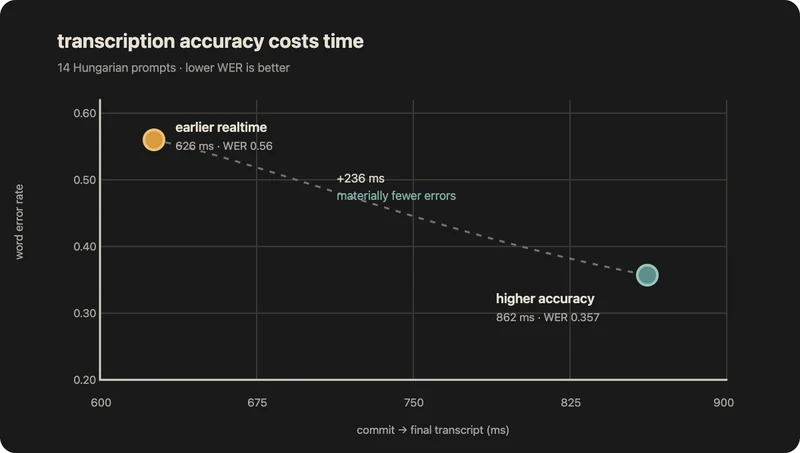
I kept the slower setup. Every later stage depends on the transcript. Saving a fraction of a second is not useful when the model answers the wrong question.
3. stop waiting for independent work
Once the transcript was ready, the application prepared the model's input. It searched for useful knowledge, checked safety, loaded workflow state, and selected the right skill.
The old code waited for these operations one after another:
knowledge = await retrieve_knowledge(turn)
safety = await check_safety(turn)
workflow = await load_workflow(conversation_id)
skill = await select_skill(turn)

prompt = build_prompt(knowledge, workflow, skill)
This is serial work. If four operations each take time, the caller waits for their combined duration.
Most of these operations did not depend on one another. I started them together instead:
async with asyncio.TaskGroup() as tasks:
    knowledge_task = tasks.create_task(retrieve_knowledge(turn))
    safety_task = tasks.create_task(check_safety(turn))
    workflow_task = tasks.create_task(load_workflow(conversation_id))
    skill_task = tasks.create_task(select_skill(turn))

knowledge = knowledge_task.result()
workflow = workflow_task.result()
skill = skill_task.result()

prompt = build_prompt(knowledge, workflow, skill)
This is concurrent work. Several operations make progress during the same period. The model usually waits for the slowest required result, not the sum of every result.
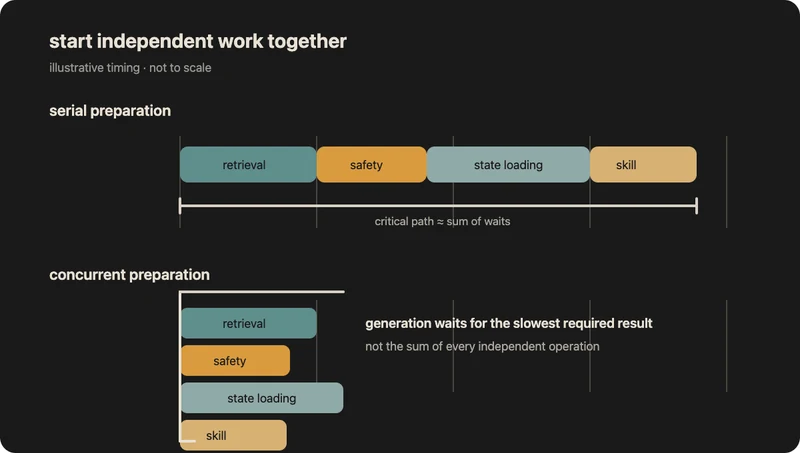
The safety check needed special care. Starting the model only after safety finished would add the full check to the wait. Speaking before safety finished would make the check useless. I let both operations run together. Before releasing the first audio, the application could wait up to 600 milliseconds for an unfinished safety result.
Parallel work also needs clear failure rules. Each operation had a deadline and a fallback. An interruption cancelled work that no longer mattered. Tasks in this phase could read data and prepare values, but they could not send messages or change workflow state. Those side effects happened only after the application chose one result.
The same serial-wait problem appeared in the database.
A database dashboard may show that each query runs quickly. The application still has to send the query over the network and wait for the result. If it sends many queries one by one, it pays that travel time again and again.
During a development test, the database was about 150 milliseconds away. Eight serial trips took about 1.2 seconds. This was not a production average. It was a clear demonstration of the multiplier.
I bundled related reads, started independent reads together, and delayed optional reads until they were needed. One workflow went from about ten database trips to four. Its measured duration fell by 48%, from 1,648 to 849 milliseconds.
I found another delay in the connection pool. A connection pool keeps database connections open so the application can reuse them. This pool checked the health of every connection each time the application borrowed one, even when the connection had just been used.
The fix was small:
async def acquire_connection(pool):
    connection = await pool.acquire()

    # Check only connections that sat unused long enough to become risky.
    if connection.idle_for > IDLE_HEALTHCHECK_SECONDS:
        await connection.ping()

    return connection
Warm connections then became almost immediate to borrow in the same test. Keeping the application and database in the same region removed much of the normal network distance. Reducing the number of trips solved a different problem. Both changes mattered.
4. reuse work before the caller needs it
The first request to an external service does extra setup. The client may need to find the server, open a connection, negotiate encryption, and authenticate. Later requests can reuse that connection.
I moved some of this setup to worker startup, before a caller needed the first answer. This is called pre-warming.
Pre-warming the database pool cut one first-turn check by about 88% in a measured run. Loading cold Python modules during startup moved another 605 to 831 milliseconds out of the first turn.
One failed attempt showed why the exact connection matters.
The speech provider offered a normal HTTP endpoint and a streaming WebSocket. A WebSocket is a connection that stays open so both sides can keep sending data. Production speech used the WebSocket, but my first warm-up called the HTTP endpoint. I had warmed the wrong door.
After I warmed the real streaming connection, time to first audio was roughly cut in half in all three local comparisons. “Warm the API” was too vague. The warm-up had to use the same host, protocol, authentication path, and client as the real request.
These gains only help a cold worker or its first caller. They do not make every later operation faster. Moving work earlier changes who waits for it.
I found a similar kind of repeated work in retrieval.
Retrieval lets the model search stored knowledge before it answers. Text is first converted into a list of numbers called an embedding. Similar text produces nearby embeddings, which makes a vector search possible.
The search was not the slow part here. Creating embeddings and rebuilding the recent conversation cost more.
The old path could embed several earlier messages again on every turn. I stored each message's embedding with the message. A normal later turn then embedded only the new text.
A cache inside one worker was not enough. Other workers could not see it, and recycled workers lost it. I moved reusable results to Redis, a shared in-memory store. Storing embeddings with the messages was even more durable because the data belonged to the conversation, not to one worker.
I also measured the typical case separately from slow outliers. Sending embedding requests directly to the provider did not change the median. It did improve p90 latency by about 67%, from 869 to 283 milliseconds. Here, p90 means that nine out of ten requests completed within that time. The change made unusually slow requests less common; it did not make the normal request much faster.
I did not remove every retrieval step. Recent conversation context added about 150 milliseconds. It also helped with follow-ups such as “what about the second option?”
I removed reranking only after a small known-answer test. The correct passage appeared in the top five for all six queries, both with and without that extra stage.
Reuse first. Remove quality checks only after testing what they contribute.
5. stream to the first word and optimize the last
A model can return text piece by piece instead of waiting for the full answer. That alone does not make a voice system stream.
Every boundary must pass partial results forward:
- Audio reaches transcription while the caller speaks.
- The final transcript reaches the application.
- Model tokens reach text-to-speech as they arrive.
- Speech audio reaches playback before the complete answer exists.
In this system, model work ran in a worker thread. Audio playback ran on an asynchronous event loop. A queue carried tokens between them:
def on_model_token(token: str) -> None:
    loop.call_soon_threadsafe(token_queue.put_nowait, token)


async def speak_tokens() -> None:
    while True:
        token = await token_queue.get()
        if token is None:
            break
        await speech_stream.send_text(token)
Text-to-speech could begin as soon as it received a safe piece of text. It did not wait for the model to finish the whole reply.
That bridge also had to preserve interruption. Voice systems call this barge-in: the caller starts speaking while the assistant is talking. An explicit thread-safe event stopped generation, cleared speech that had not played, and cancelled work that was no longer useful.
Text filtering had to work across model chunks too. These chunks are internal and do not match spoken pauses. A phone number might arrive as 415-555- followed by 0198. Redaction code waited until it could see the complete pattern before sending it to speech. The final transcript stored what the caller actually heard, not the model's unfiltered draft.
Timeouts needed the same care. A normal read timeout resets whenever new data arrives. A provider could therefore send occasional bytes and keep a slow request alive for too long. I added one deadline around the complete stream:
async with asyncio.timeout(MAX_TURN_SECONDS):
    async for chunk in provider.stream(request):
        yield chunk
I could not change how an external model ran internally. I could control when the request started, the network connection, the amount of context, the model, and its reasoning setting.
Turning off reasoning where the voice task did not need it saved roughly one to two seconds before the first token across two tests. I also removed repeated prompt data. A few high-confidence classifications moved from model calls to ordinary code, with the model kept as a fallback for uncertain cases.
Then I looked beyond the first word.
Voice interfaces pay for every generated word twice. The model must generate it, and the caller must listen to it.
In one observed pair, a 242-character answer took 18.5 seconds to speak. A 297-character answer took 21.6 seconds. Just 55 extra characters made the caller wait 3.1 seconds longer before replying. Speaking rate changes with the language, voice, and punctuation, so this is an example rather than a universal rate.
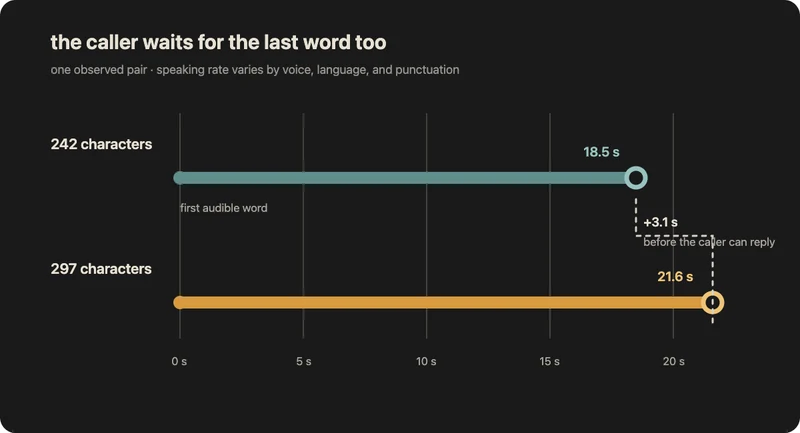
I later reduced the response limit from about 300 to 150 characters on this path. The assistant became easier to follow and interrupt. Shorter answers were both a product choice and a latency improvement.
The final changes affected different kinds of waiting:
| Part of the experience | What changed | Impact in its measured test |
|---|---|---|
| Knowing the caller is done | Lowered the maximum endpoint delay | 28% lower maximum wait |
| Loading conversation data | Reduced database trips from about ten to four | 48% faster workflow path |
| Starting a cold worker | Prepared the database pool early | About 88% faster first-turn check |
| Starting speech | Warmed the real streaming connection | Roughly half the wait in three local comparisons |
| Slow embedding outliers | Used the direct provider route | About 67% lower p90; median stayed similar |
| Starting the model reply | Disabled unnecessary reasoning | Roughly one to two seconds saved in two tests |
| Finishing the spoken reply | Shortened the answer | 3.1 seconds saved in one observed pair |
Some waiting was worth keeping. Better transcription cost about 240 milliseconds. Conversation-aware retrieval added about 150 milliseconds. The safety result could delay the first audio by up to 600 milliseconds when it was still running.
Latency is a budget, not the only goal. I first remove repeated setup, serial waiting, and unnecessary model work. I am willing to spend a measured amount of time when it buys accuracy or safety that the caller would notice.
There is more I could test. The system might begin safe, read-only planning before it is completely sure the caller has finished. Regional workers might shorten the media path for callers far away. Both ideas add complexity, so I would measure that path before building them.
The largest improvement came from changing the unit of measurement. A model call is one component. A conversation turn is the real product.
Once I measured the entire turn, the useful changes became easier to see. Do less work. Begin independent work together. Reuse what is already available. Keep partial results moving toward the caller.
references
- LiveKit: turns and turn detection
- LiveKit: tuning turn taking and endpointing
- LiveKit: semantic turn detector
- HTTPX: persistent clients and connection pooling
- HTTPX: timeout types
- AWS: application and database placement
- AWS: multi-region architecture
- ElevenLabs: reducing text-to-speech latency
- ElevenLabs: real-time text-to-speech over WebSockets
- ElevenLabs: audio streaming and chunk timing
- OpenAI: create a transcription